A real-time pipeline that watches a camera, notices movement, works out what moved,
and follows it across frames. Each subject gets an identity it keeps while it is in
view, a class, and a record of how long it stayed — so the output is a list of things
that happened, not a pile of boxes.
Python 3.11 · OpenCV · YOLO11 · ByteTrack · runs on Apple silicon via MPS · 57 tests
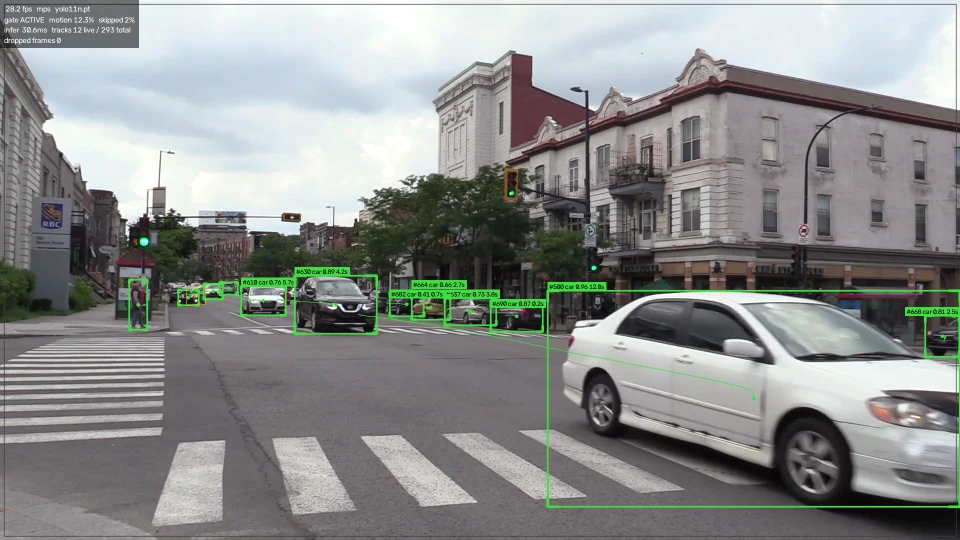
Every confirmed subject gets a green box, an identity, a class and a running dwell time. Twelve are being tracked here at once, out of 293 seen so far in the clip.
01 How it works
Four stages, and one of them does most of the work.
Capture
Decoding runs on its own thread so inference never stalls it. A camera's frames are
perishable, so when the pipeline falls behind, stale frames are dropped rather than
queued — a tracker fed old frames reports the past confidently. A recorded file is
the opposite: every frame is data, so the decoder waits instead.
The motion gate
Background subtraction on a quarter-resolution greyscale frame costs about 1.3ms.
The object detector costs about 25ms. Every surveillance scene is empty most of the
time, so putting the cheap test in front of the expensive one is most of the
performance story.
Detect and associate
YOLO11 names what it finds and ByteTrack links those detections frame to frame, so a
subject keeps one identity while it is visible. Boxes are clipped to the frame: a
track can never describe something the camera cannot see.
Lifecycle
A box in one frame is noise. A subject seen for several consecutive frames is an
event. Tracks are promoted from tentative to confirmed, and only confirmed ones are
ever reported — a two-frame flicker never becomes a notification.
The part I care about most is how a track ends. If a subject disappears within a few
pixels of the frame border it is recorded as exited: it walked out of
shot. If it disappears in open frame it is recorded as lost: something
occluded it, or detection dropped out. Those are different events and most hobby
implementations conflate them. Separating them is the difference between "someone left"
and "I stopped being able to see them".
02 See it
Watch it pick things up and let them go.
Twelve seconds of a real intersection. Cars pull away from the light,
traffic crosses, pedestrians move along the far pavement. Each subject is picked up,
classified, given an identity and followed until it leaves the frame, where it is logged
as exited. Nothing here is staged: this is unmodified stock footage the tracker had never
seen, processed exactly as the tool ships. Over the full 64-second clip it confirms 372
separate tracks and holds up to 19 at once.
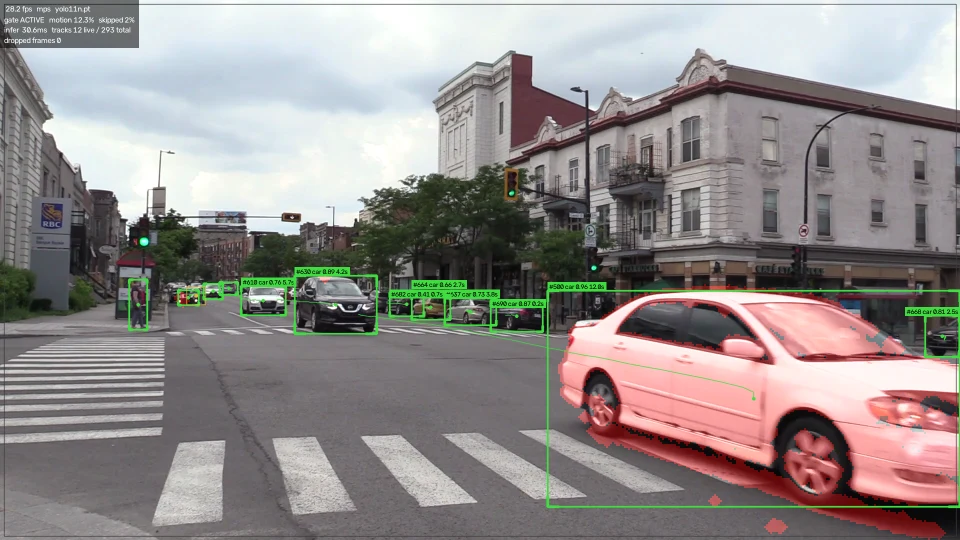
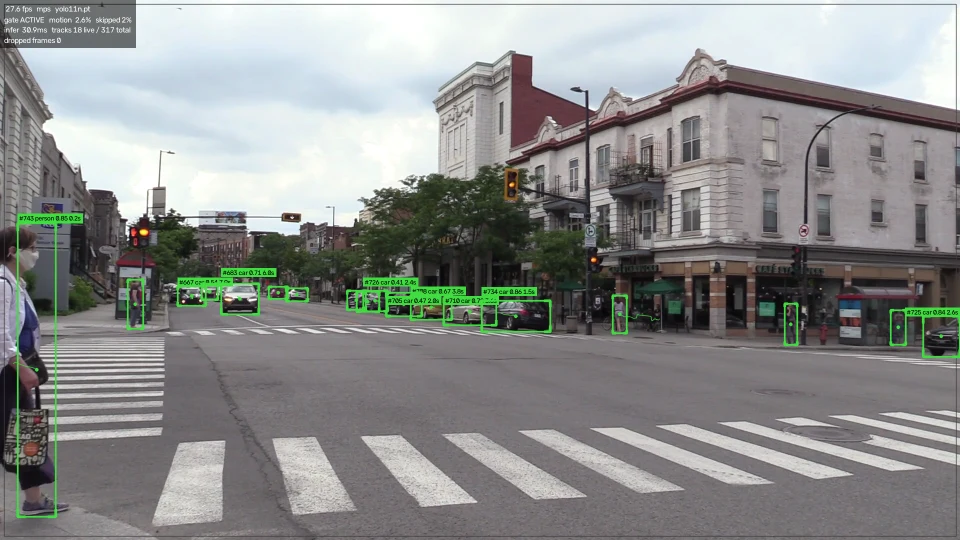
Motion is not the same as objects. Red is what the gate thinks is moving: only the car crossing the foreground. The cars queued at the light are still detected and tracked, but they contribute nothing to the gate.Later in the same clip. Track numbers climb as subjects come and go; each new arrival earns its own identity rather than inheriting one.
The panel in the corner is live instrumentation: frame rate, whether the gate is open,
how many frames it has skipped, inference time, how many tracks are alive, and how many
frames were dropped. It was built to answer "why is this slow", and it has twice caught
me being wrong about that.
03 What it costs
Measured, not estimated.
Measured on an M1 MacBook with startup excluded — loading weights and compiling GPU
kernels is a one-off cost, and charging it to the frame rate flatters the result. The
clip and webcam figures are the median of three runs at 1280×720; the intersection
figures are from the 1080p footage above.
Quiet clip
51 fps with the gate on against 38 fps without it,
skipping 31% of frames. With nothing throttling the input, avoided inference turns
straight into throughput.
The intersection above
30 fps on 1080p footage at a 960px inference size, 30ms per frame,
19 subjects tracked simultaneously and 372 over the full minute. The gate skips just
3.4% of frames here.
Live webcam
30 fps, which is the camera's own ceiling, dropping 2–7% of frames
against 3–17% without the gate. Here the gate buys no extra speed — it buys headroom
and a tighter worst case.
The middle figure is the one that keeps me honest about the whole design. The motion gate
is the centrepiece of this pipeline, and on a continuously busy intersection it earns
almost nothing — 3.4% of frames skipped, because something is always moving. Its value is
entirely a function of how empty the scene is: enormous on a driveway at night, negligible
here. An optimisation worth keeping, and worth being specific about rather than quoting
the number that flatters it.
The same applies to the live camera. A 30 fps feed cannot be outrun, so claiming the gate
made it faster would be false; what it does is skip inferences and keep the slowest frames
from spiking. Working that out meant finding two measurement bugs of my own first:
throughput was being divided by frames instead of intervals, and a fifth of every live run
was being thrown away during GPU warmup because the camera started before the model was
ready.
04 What is next
From a viewer to a system.
Right now it shows you what it sees. The next step is making it remember: writing each
confirmed track to a database with a short clip around it, adding zones and line
crossings so a subject can trigger on where it went rather than merely existing, and
exporting the detector to CoreML so inference runs on the Neural Engine instead of the
GPU. The groundwork is already there — every track carries its own history, so the event
layer is a consumer of it rather than a rewrite.
Demo footage: Traffic Flow In An Intersection,
free stock video under the Pexels licence. The overlay is this project's output; the
footage underneath it is unmodified.